
Understanding Objects in JavaScript

let me tell you about the moment arrays stop being enough.
imagine you're building a small app that stores information about a student. you try using an array:
let student = ["Arjun", 21, "Computer Science", true, 9.1];
technically this works. but now tell me — what is 9.1? what does true mean? what is 21 referring to? you have no idea without counting positions and remembering what you put where. and if you add a new piece of information somewhere in the middle, every index shifts and your whole mental map breaks.
arrays are ordered lists. they're perfect when you have a sequence of similar things — a list of scores, a list of names, a list of prices. but when you have a collection of different properties that all describe one thing, arrays get messy fast.
that's exactly the problem objects solve. an object lets you store information as named pairs instead of numbered positions. instead of student[0] for the name, you write student.name. instead of student[4] for the GPA, you write student.gpa. each piece of data gets a label, and that label is the key to accessing it.
this is the fundamental shift — from position-based to name-based. and once you make that shift, your code becomes dramatically easier to read, write, and maintain.
What an Object Actually Is
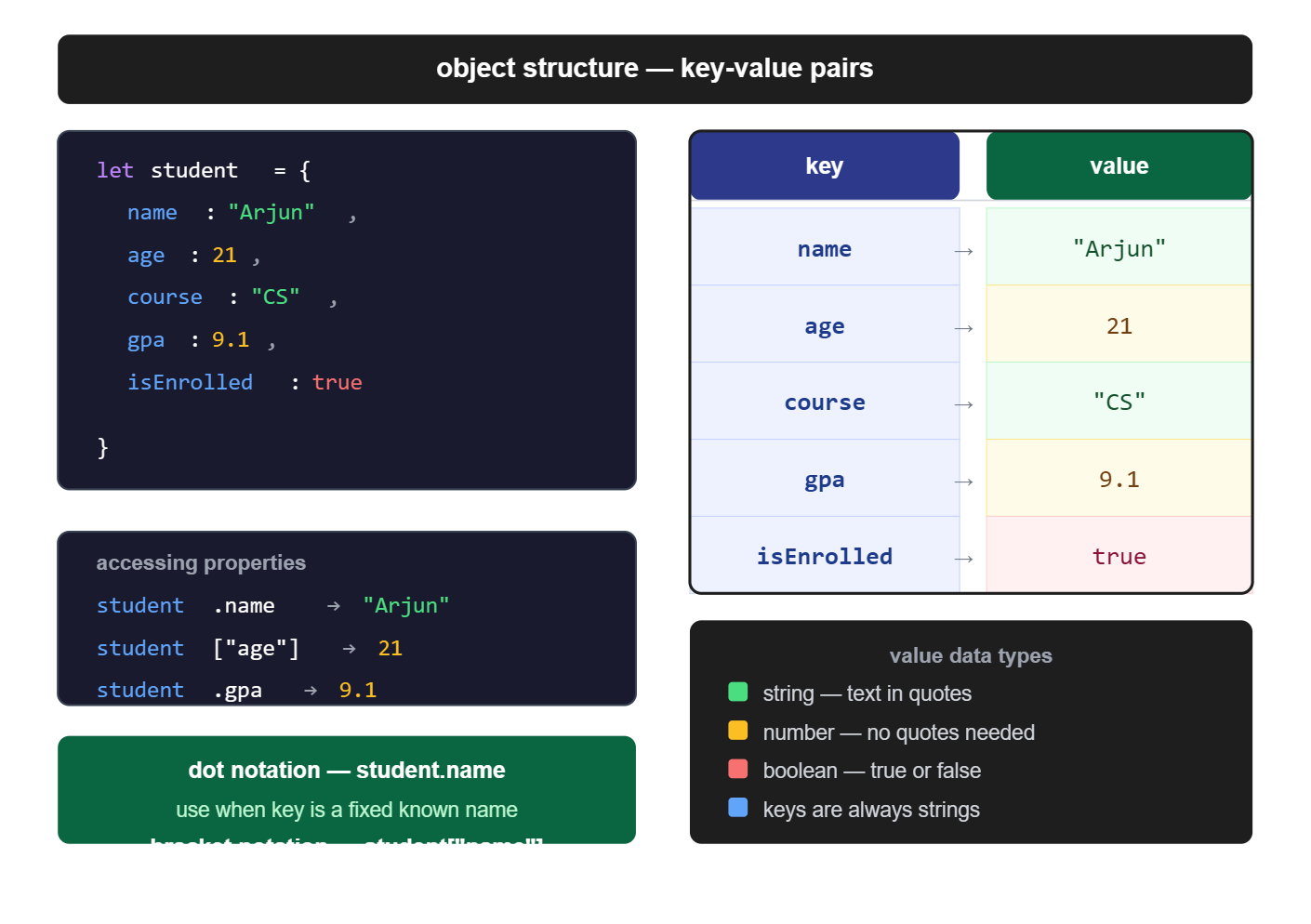
an object in JavaScript is a collection of key-value pairs. every piece of data inside it has two parts — a key, which is the name you give it, and a value, which is the actual data.
think of it like a form you fill out. the form has fields — Name, Age, City, Email. each field has a label (the key) and you fill in your information (the value). the whole filled-out form is the object.
let person = {
  name: "Arjun",
  age: 21,
  city: "Pune",
  isStudent: true
};
the curly braces define the object. inside, each line is one key-value pair. the key comes first, then a colon, then the value. pairs are separated by commas. the whole thing ends with a semicolon because it's an assignment.
you can store any data type as a value — strings, numbers, booleans, arrays, even other objects. the keys are almost always strings but you don't need to put quotes around them unless the key has a space in it (which you should avoid anyway).
see this diagram :
let's look at a more complete real-world example. imagine you're building a food delivery app and you need to store details about a restaurant:
let restaurant = {
  name: "Sharma's Dhaba",
  rating: 4.3,
  location: "Connaught Place, Delhi",
  isOpen: true,
  cuisine: "North Indian",
  minimumOrder: 150
};
six pieces of information about one restaurant, all stored in one variable, all clearly labeled. compare that to trying to track this in an array — it would be a nightmare.
Arrays vs Objects — The Difference in One Picture
visualize this :
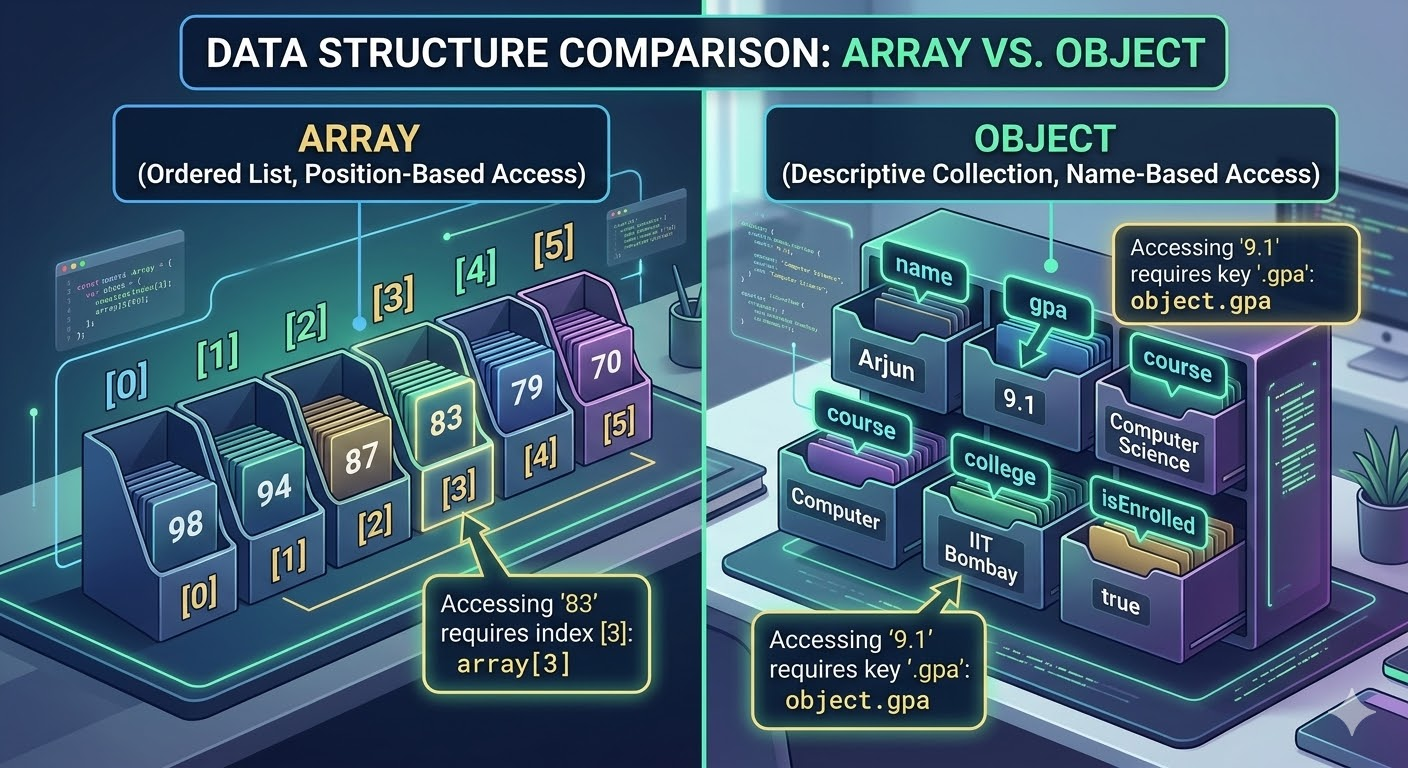
before we go deeper into objects, I want to make the distinction crystal clear because beginners sometimes confuse when to use which.
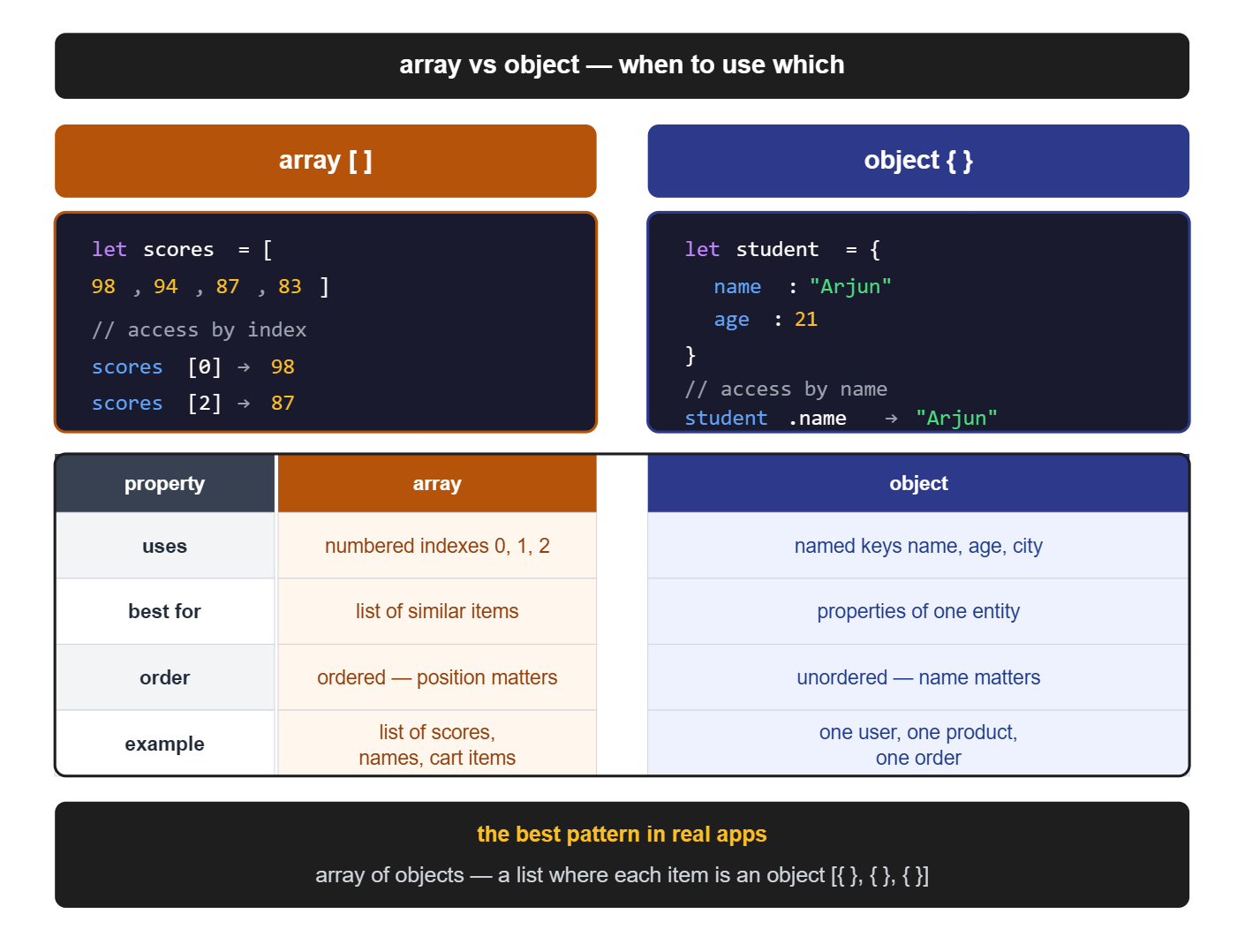
use an array when you have a list of similar items where order matters:
let topScores = [98, 94, 87, 83, 79];
let daysOfWeek = ["Monday", "Tuesday", "Wednesday", "Thursday", "Friday"];
let cartItems = ["Notebook", "Pen", "Eraser"];
use an object when you have multiple different properties all describing one thing:
let student = {
  name: "Priya",
  age: 20,
  course: "Design",
  gpa: 8.7
};
in an array, items are accessed by index — cartItems[0]. in an object, properties are accessed by name — student.name. arrays are a sequence. objects are a description.
a good mental test — if you can number the items and their order matters, use an array. if each piece of data has a distinct label and describes one entity, use an object.
Creating an Object
you've already seen the main way to create an object — the object literal syntax. curly braces, key-value pairs, commas between them.
let laptop = {
  brand: "Dell",
  model: "Inspiron 15",
  ram: 16,
  storage: 512,
  isAvailable: true
};
you can also create an empty object and add properties to it later:
let laptop = {};
this is useful when you don't have all the data upfront. maybe you're building the object step by step based on user input, or you're receiving data from an API piece by piece.
one thing to note — object keys are typically written in camelCase when they're multiple words. so instead of "minimum order" (which would need quotes because of the space) you write minimumOrder. it's cleaner and consistent with the rest of JavaScript naming.
Accessing Properties — Dot Notation
dot notation is the most common and readable way to access a value from an object. you write the object name, a dot, then the key.
let movie = {
  title: "Drishyam 2",
  director: "Abhishek Pathak",
  releaseYear: 2022,
  rating: 8.2,
  language: "Hindi"
};

console.log(movie.title);       // Drishyam 2
console.log(movie.director);    // Abhishek Pathak
console.log(movie.rating);      // 8.2
console.log(movie.releaseYear); // 2022
you can use the accessed value directly in expressions :
console.log("Now watching: " + movie.title + " (" + movie.releaseYear + ")");
// Now watching: Drishyam 2 (2022)

if (movie.rating >= 8) {
  console.log("Highly recommended!");
}
// Highly recommended!
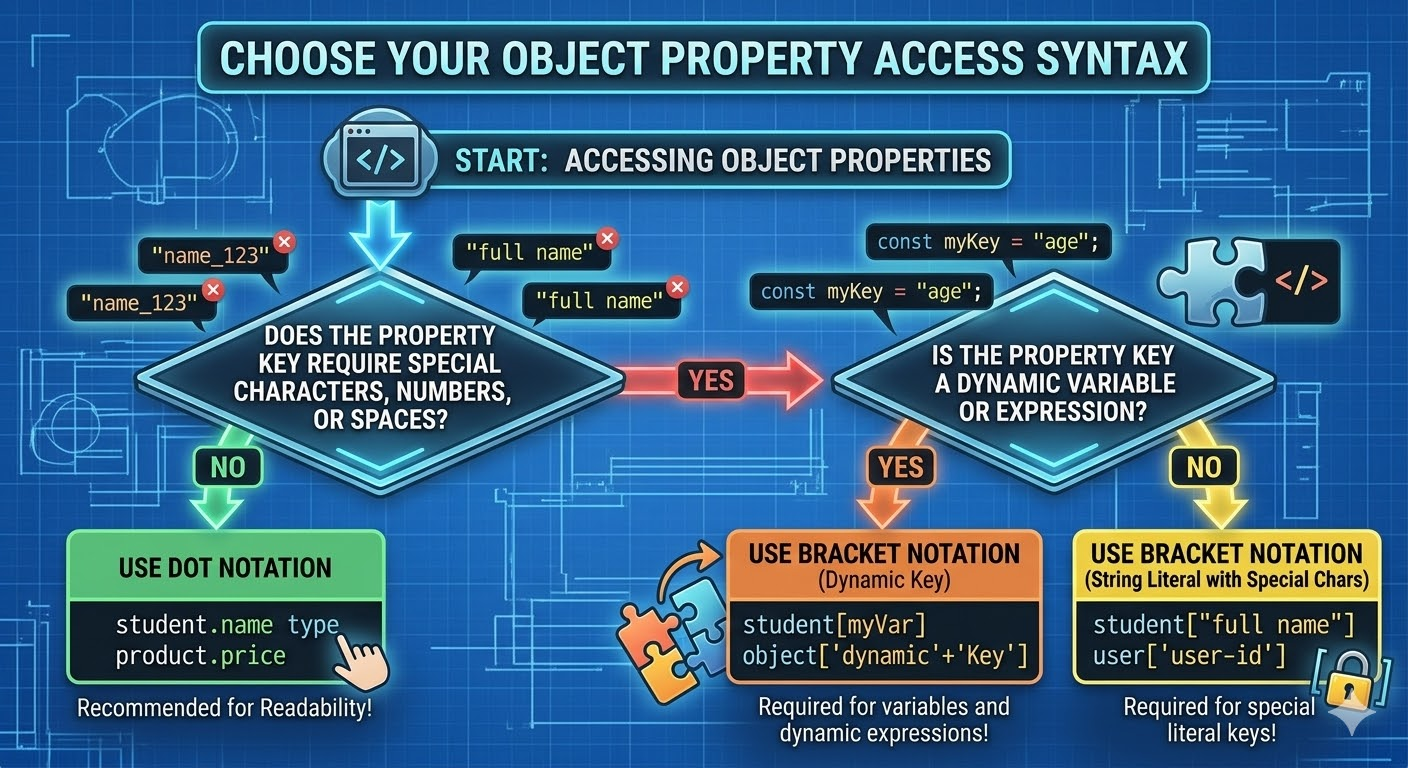
dot notation works whenever the key is a valid identifier — meaning it starts with a letter, has no spaces, no special characters. which covers almost everything you'll normally write.
Accessing Properties — Bracket Notation
bracket notation is the other way to access object properties. instead of a dot, you use square brackets with the key as a string inside:
console.log(movie["title"]);    // Drishyam 2
console.log(movie["rating"]);   // 8.2
this looks more verbose for everyday use, so why does it exist? two main reasons.
first — when the key has a space or special character in it (though again, avoid this if you can):
let profile = {
  "full name": "Rohit Sharma",
  "account type": "premium"
};

console.log(profile["full name"]);    // Rohit Sharma
console.log(profile["account type"]); // premium

// dot notation would break here
// profile.full name is a syntax error
second — when you need to use a variable as the key. this is the big practical use case:
let product = {
  name: "Wireless Earbuds",
  price: 1299,
  stock: 45,
  category: "Electronics"
};

let keyToAccess = "price";
console.log(product[keyToAccess]); // 1299

keyToAccess = "stock";
console.log(product[keyToAccess]); // 45
when you put a variable inside the brackets, JavaScript evaluates the variable first, gets its value (the string "price"), and then uses that to find the property. this is extremely useful when you're dynamically deciding which property to access — for example, based on user input or a loop variable.
with dot notation you can't do this — product.keyToAccess would literally look for a property named keyToAccess, not the value stored in that variable.
don't remember just visulize it :
Updating Properties
updating a property is straightforward — access it the same way you'd read it, then assign a new value.
let employee = {
  name: "Sneha Kulkarni",
  department: "Marketing",
  salary: 45000,
  isFullTime: true
};

console.log(employee.salary); // 45000

// she got a raise
employee.salary = 52000;

console.log(employee.salary); // 52000

// she moved departments
employee.department = "Product";

console.log(employee.department); // Product
the object still exists as the same variable — you're just changing what's stored inside a particular key. this is how you'd reflect real-world changes in your data — a user updates their profile, a product price changes, a status flag flips.
Adding and Deleting Properties
objects are not fixed structures. you can add new properties to an existing object at any time, and you can remove properties you no longer need.
adding a new property
same syntax as updating — if the property doesn't exist yet, JavaScript creates it. if it already exists, it updates it.
let book = {
  title: "Atomic Habits",
  author: "James Clear"
};

console.log(book); // { title: 'Atomic Habits', author: 'James Clear' }

// add new properties
book.pages = 320;
book.genre = "Self-Help";
book.isRead = false;

console.log(book);
// { title: 'Atomic Habits', author: 'James Clear', pages: 320, genre: 'Self-Help', isRead: false }
three new properties added after the object was created. the object grew dynamically.
deleting a property
use the delete keyword followed by the property you want to remove:
let userProfile = {
  username: "coder_priya",
  email: "priya@example.com",
  password: "hashed_value_123",
  age: 24,
  city: "Bengaluru"
};

// password shouldn't be on the frontend — remove it
delete userProfile.password;

console.log(userProfile);
// { username: 'coder_priya', email: 'priya@example.com', age: 24, city: 'Bengaluru' }
the password key is completely gone. deleting is useful when you're cleaning data before displaying it — things like removing sensitive fields before sending user data to the frontend, or clearing temporary properties once you're done with them.
Looping Through an Object
what if you want to go through all the properties of an object without writing each one out manually? that's what for...in is for. it's a special loop designed specifically for iterating over object keys.
let student = {
  name: "Kavya Reddy",
  age: 22,
  course: "Data Science",
  college: "IIT Hyderabad",
  gpa: 9.2
};

for (let key in student) {
  console.log(key + ": " + student[key]);
}


/** output:

name: Kavya Reddy
age: 22
course: Data Science
college: IIT Hyderabad
gpa: 9.2 **/
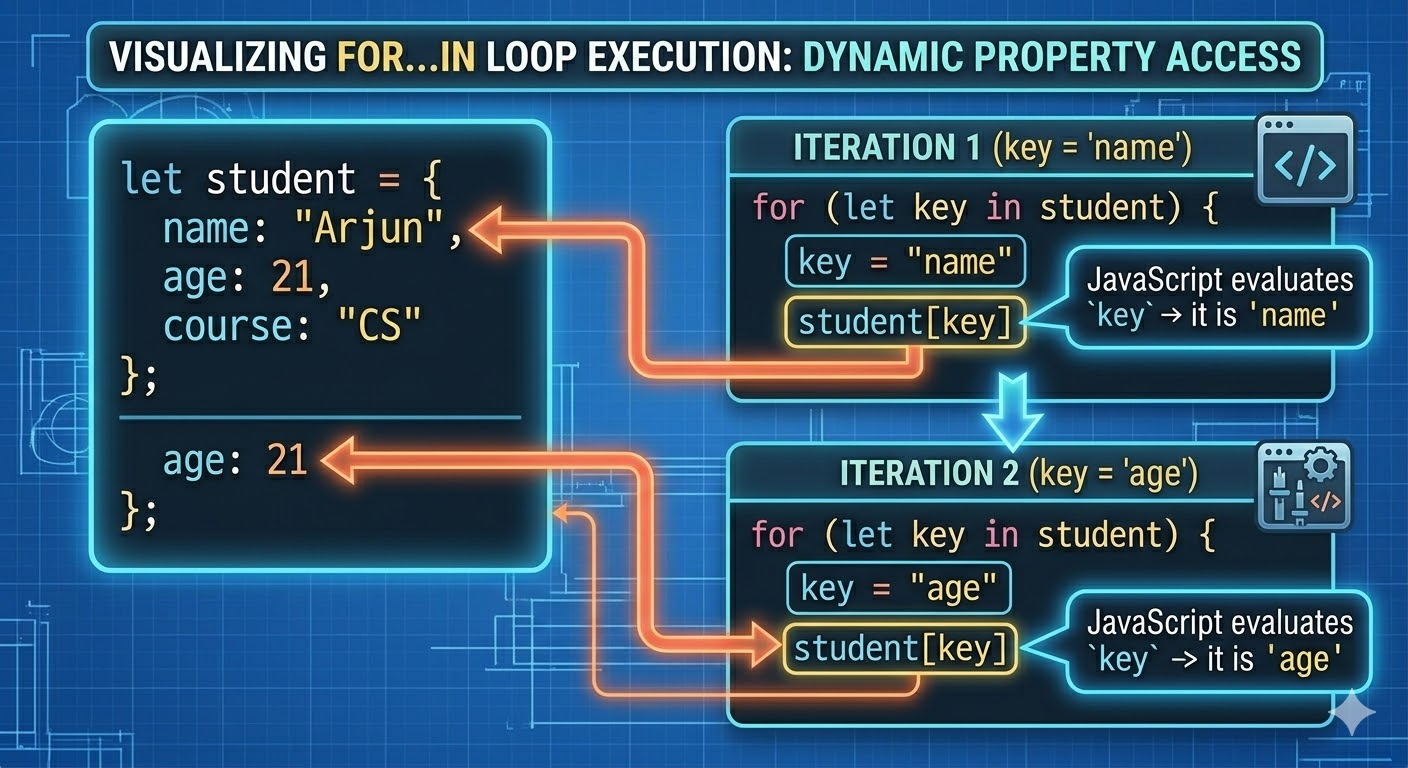
let's trace through what's happening. the for...in loop goes through each key in the object one at a time. on the first iteration, key is the string "name". on the second, key is "age". and so on.
inside the loop, we use bracket notation — student[key] — because key is a variable. you can't use student.key here because that would literally look for a property named "key", which doesn't exist.
this is the exact situation bracket notation was built for. the key is dynamically changing on every loop iteration, so you need bracket notation to evaluate the variable.
a more practical use — printing all of a product's details in a formatted way:
let product = {
  name: "Mechanical Keyboard",
  brand: "Keychron",
  price: 7499,
  switches: "Brown",
  wireless: true,
  warranty: "1 year"
};

console.log("--- Product Details ---");
for (let key in product) {
  console.log(key + " : " + product[key]);
}
/**

output:
```
--- Product Details ---
name : Mechanical Keyboard
brand : Keychron
price : 7499
switches : Brown
wireless : true
warranty : 1 year */
you could add more properties to this object tomorrow and the loop would automatically pick them up — no code changes needed.
getting just the keys or just the values
JavaScript also has two built-in methods for this — Object.keys() gives you an array of all the keys, and Object.values() gives you an array of all the values.
let car = {
  make: "Tata",
  model: "Nexon",
  year: 2023,
  color: "Cosmic Gold",
  fuelType: "Petrol"
};

console.log(Object.keys(car));
// ["make", "model", "year", "color", "fuelType"]

console.log(Object.values(car));
// ["Tata", "Nexon", 2023, "Cosmic Gold", "Petrol"]
once you have these as arrays, you can use all the array methods you already know — forEach, map, filter — to work with them.
Objects Inside Arrays — The Pattern You'll See Everywhere
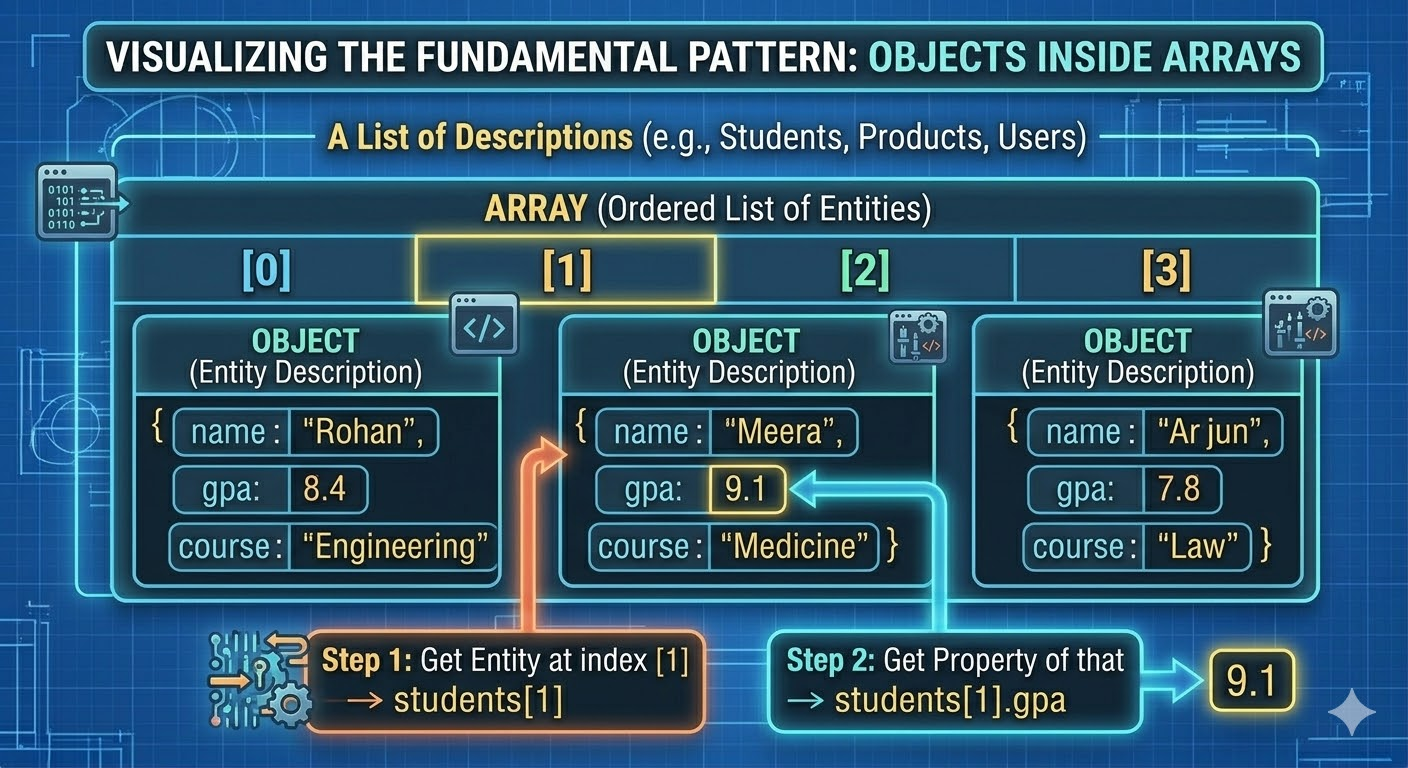
this is where everything starts connecting. in real applications you almost never have just one object. you have a list of objects — a list of users, a list of products, a list of orders. that's just an array where each item is an object.
let students = [
  { name: "Rohan", gpa: 8.4, course: "Engineering" },
  { name: "Meera", gpa: 9.1, course: "Medicine" },
  { name: "Arjun", gpa: 7.8, course: "Law" },
  { name: "Divya", gpa: 9.5, course: "Computer Science" }
];

// access the second student's name
console.log(students[1].name); // Meera

// loop through all students
students.forEach(function(student) {
  console.log(student.name + " — GPA: " + student.gpa);
});
```

output:
```
Rohan — GPA: 8.4
Meera — GPA: 9.1
Arjun — GPA: 7.8
Divya — GPA: 9.5
students[1] gets the second object from the array. then .name accesses the name property of that object. this chained access — array index followed by dot notation — is something you'll write constantly in real projects.
let's use filter to find only students with a GPA above 9:
let topStudents = students.filter(student => student.gpa > 9);
console.log(topStudents);
// [{ name: 'Meera', gpa: 9.1, course: 'Medicine' }, { name: 'Divya', gpa: 9.5, course: 'Computer Science' }]
and map to extract just the names:
let names = students.map(student => student.name);
console.log(names); // ["Rohan", "Meera", "Arjun", "Divya"]
for better visualization see this picture :
this is where everything from the previous posts — arrays, array methods, arrow functions, objects — clicks together. real JavaScript code is largely built around this pattern of arrays of objects being transformed, filtered, and displayed.
Your Assignment
open your browser console or playcode.io and build this.
Part 1 — create the object
create an object called myStudent with at least five properties — name, age, course, college, and isEnrolled. pick values that make sense. then print the entire object using console.log to see the full structure.
Part 2 — access and update
access and print the name and course properties using dot notation. then update the age property to a different number. print the object again to confirm the change happened.
Part 3 — add and delete
add two new properties to myStudent — cgpa with a number value, and hostel with a boolean (true if they live in hostel). then delete the isEnrolled property. print the final object.
Part 4 — loop through it
use a for...in loop to print every key and its value from your final myStudent object. make sure you're using bracket notation inside the loop to access the values.
Final Thoughts
objects are the backbone of real JavaScript applications. every user account, every product listing, every API response, every configuration — these are all objects. the moment you understand key-value pairs and how to create, read, update, and loop through them, a massive portion of real-world code starts making sense.
the combination of objects and arrays — arrays of objects, especially — is the pattern you'll encounter more than almost anything else in JavaScript. user lists, product catalogs, search results, order histories — all of these are arrays of objects. and now you have all the tools to work with them.
Connect with me here :
Twitter or X : https://x.com/Curious_Karann
LinkedIn : https://www.linkedin.com/in/karan-hingrajiya-82a78b2a4/
See you in the next blog !! until then keep growing and keep coding 🔥!!